

AI has changed how presentations get made. What used to take hours of structuring, writing, and designing can now happen in minutes. But as more teams turn to AI, it’s not without its challenges. How do you move fast with AI without ending up with a generic, dehumanized deck that feels off brand?
At Beautiful.ai, we believe the best AI doesn’t replace your judgment or design instincts. It amplifies them. That belief is behind our latest improvements to AI presentation generation—focused on clarity, visual quality, and, most importantly, control.
Here’s how to use AI to create presentations that are faster, smarter, and still unmistakably yours.
The problem with “hands-off” AI presentations
Many AI presentation tools promise instant decks, but the tradeoff is often obvious the moment you open the slides:
- Repetitive layouts
- Stock-looking visuals
- Little ability to steer the outcome
- Design choices you didn’t actually choose
Even when the content is technically “right,” the presentation can feel visually dry or disconnected from your brand. And if you don’t see clear ways to guide the AI up front, fixing things later can feel like starting over.
That’s not how AI should feel.
The new mindset: AI as a design partner, not a black box
The future of AI presentations isn’t about pushing a button and hoping for the best. It’s about setting direction early, then refining with precision. AI is your design partner, not just a shortcut.
That’s why our updated AI generation flow is built around the idea that you should decide how your presentation looks before AI decides what it creates.
Here’s what that looks like in practice.
1. Start with the design, not the prompt
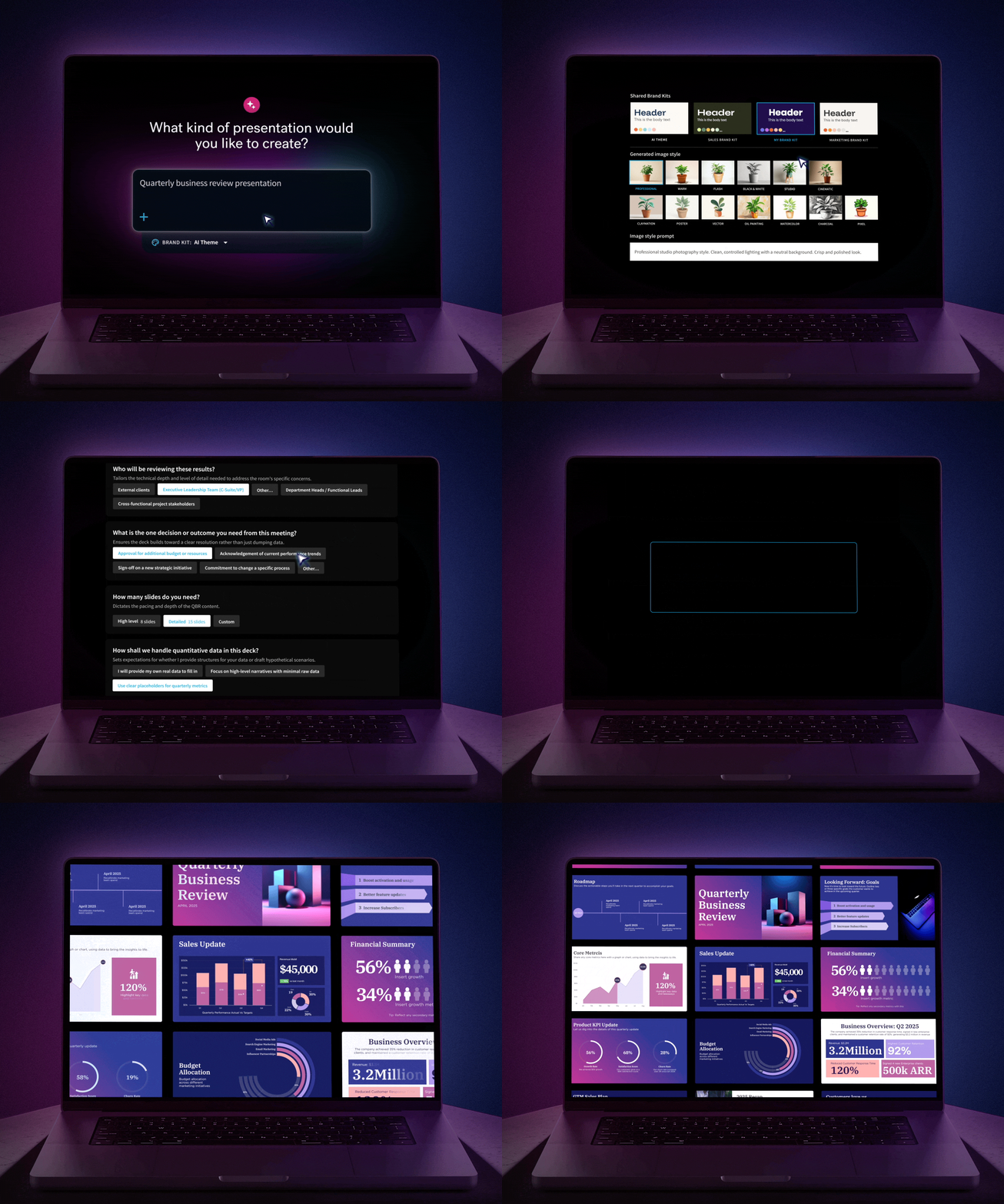
One of the biggest shifts in our AI workflow is Brand Kit selection before generation.
Instead of generating a deck and discovering too late that the style doesn’t fit, you now choose your Brand Kit up front:
- Your team Brand Kit (by default)
- Any saved Brand Kit
- Or a built-in Beautiful.ai Brand Kit like Daybreak

This single step dramatically changes outcomes. It ensures your presentation starts aligned with your brand, layout rules, and visual tone before a single slide is written.
The result is less rework, more consistency, and presentations that immediately feel intentional.
2. Use AI-generated images that actually match your vision
Images are often where AI presentations fall apart. Generic stock photos break cohesion and make slides feel repetitive (or worse, robotic).
Now, you can choose to generate custom AI images as part of your deck creation—with control over how those images look.
- Select from curated image styles with live previews
- Or write your own custom image style prompt from scratch
- See what you’ll get before committing

This keeps visuals cohesive across slides and makes the experience far more creative—and honestly, more fun.
And if an image isn’t quite right? You can regenerate a single image inside your presentation, adjusting the prompt or style without touching the rest of the slide. This helps visuals feel intentionally designed, not dropped in.
3. Give AI better context (so it gives you better output)
AI is only as good as the information it’s given.
We’ve made it clearer—and easier—to add meaningful context when generating a presentation:
- Paste text directly
- Upload a document
- Reference a website
Instead of a blank prompt box, the interface now encourages you to guide the AI with real inputs. That means stronger structure, more accurate messaging, and fewer generic slides.
Your content should reflect your ideas, not filler copy.
4. Edit with AI—without losing the human touch
Once your presentation is generated, control doesn’t stop.
In Beautiful.ai you can:
- Edit or rewrite slide text using AI
- Generate new slides with full awareness of the existing deck
- Ask for summaries, refinements, or expansions using context from the presentation

Because AI understands what’s already there, even simple prompts like “make this more concise” or “add a summary slide” produce smarter, more relevant results.
This faster iteration allows you to get from idea to impact without breaking flow or consistency.
5. Create once, present everywhere with smarter language support
Great presentations travel, and now language does too.
With smarter language support you can generate an entire deck in a selected language from the start, translate a single slide or the whole presentation later, or rewrite content for different audiences or regions. This makes it dramatically easier for global teams to stay aligned without rebuilding decks from scratch.

Why control matters more than ever
AI is powerful, but without guidance it can feel unpredictable. With better guidance, more context, and the right control of design you can change that dynamic.
We made updates to reimagine AI that works for you, and your work. With these changes, teams trust AI as part of their workflow, not a shortcut they have to fix. But most importantly, they raise the ceiling on quality. With more Smart Slide templates, better image generation, and clearer controls, AI presentations now showcase the best of what Beautiful.ai can do.
AI shouldn’t take control away from you—it should give it back.
When you guide the design first, shape the visuals, and refine with intention, AI becomes what it was always meant to be: a creative accelerator, not a compromise.
And that’s how you create presentations faster—without ever losing your design voice.





.gif)