

Creating visuals for a presentation used to mean searching through endless stock libraries, settling for something close enough, or spending hours designing an asset from scratch. Now, you can describe what you want in a sentence and get a custom image in seconds.
That’s the promise of AI image generation.
But while the technology is fast, the results aren’t always perfect on the first try. If you’ve ever generated an image that felt generic, repetitive, or slightly off from what you imagined, you’ve experienced the real learning curve of generative AI: prompting.
Understanding how AI art works—and how to guide it—is what transforms quick outputs into polished, presentation-ready visuals.
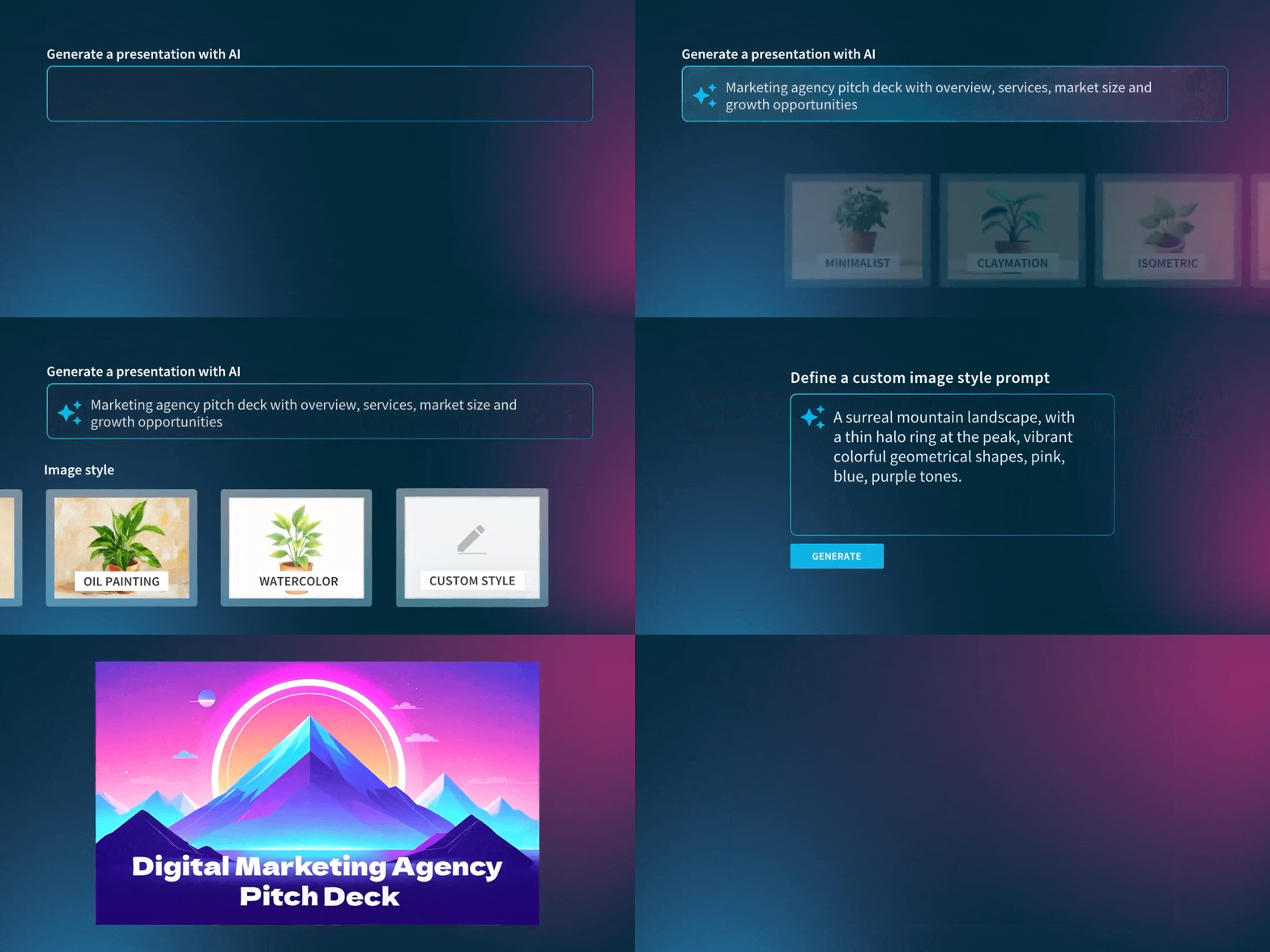
With our upgraded AI experience and new image generation model, you now have more control than ever. This unlocks the ability for users to define image styles, preview aesthetics, regenerate individual visuals, and create more cohesive decks from the start. But it all starts with a good prompt.
Let’s dive into the basics.
How does AI art work?
If you’ve ever wondered “how does AI-generated art work?”, you're not alone.
At a high level, AI image generators are trained on enormous datasets of images paired with text descriptions. Over time, the model learns how words relate to visual elements—how “sunset” affects lighting, how “watercolor” changes texture, how “corporate headshot” influences framing and composition.
When you type a prompt, the AI doesn’t go find an existing image. It generates a brand-new one by predicting what the pixels should look like based on patterns it learned during training.
For example, if you enter “a futuristic city skyline at sunset in watercolor style,” the model interprets each component—subject, environment, time of day, artistic style—and synthesizes them into something original.
The clearer your instructions, the clearer the output. That’s why prompting matters so much.
Why some AI images fall flat
If your results feel generic, it’s usually because the prompt was too broad.
A single-word input like “teamwork” leaves enormous room for interpretation. The AI may default to common visual patterns—smiling coworkers in a bright office, high-fives, laptops, exposed brick. Technically correct, but creatively uninspired.
But when you shift from vague to specific, everything changes. The better your prompt, the more you get away from stale, stock-like photography.
Instead of “teamwork”, try “a diverse team collaborating around a glass conference table in a modern office, natural lighting, candid photography, professional atmosphere.”
Now the AI has direction. It understands the setting, mood, lighting, and style. The image becomes intentional instead of generic.
Think of it this way: AI image generation isn’t magic—it’s collaboration. And the quality of collaboration depends on how clearly you communicate.
The anatomy of a strong prompt
One of the easiest ways to improve your results is to structure your prompts more deliberately.
Strong prompts typically include:
- A clear subject
- The environment or context
- Visual style
- Lighting or mood
- Any important details
For example: “A female founder presenting to investors in a sleek boardroom, cinematic lighting, professional photography, confident and inspiring tone.”
Notice how each phrase adds clarity. The AI parses descriptive language and translates it into visual characteristics. Without structure, it simply guesses.
Designing for the slide, not just the image
Another common mistake is forgetting where the image will live.
A presentation slide isn’t a social media post or a website hero banner. Slides need clarity, focus, and room for content. Overly busy scenes can compete with your message instead of supporting it.
If you’re designing a slide with text overlay, consider guiding the AI accordingly: “Minimalist tech office scene with one person working on a laptop, soft background blur, clean composition, space on the left for text.”
That small addition—“space on the left for text”—can dramatically improve usability.
The goal is to generate an image that complements your story.
Iteration is part of the process
Even when you understand how AI generated art works, the first result won’t always be perfect. That’s normal. AI image generation is inherently iterative. Small adjustments can make a big difference:
- Adding “soft natural lighting”
- Changing “illustration” to “editorial photography”
- Simplifying a crowded scene
- Specifying a color palette
With Beautiful.ai, you can regenerate individual images directly within your presentation. You can tweak the content prompt or shift the style without starting over.
Treat prompting like refining a draft. Each version gets you closer to the look you want.
Define your style from the start
One of the most impactful upgrades in our new AI image generator experience is style control.
Previously, some users felt AI-generated decks leaned too heavily on stock visuals or lacked cohesion. Now, you can choose your image style before generating your presentation—and even preview examples before committing.
Want cinematic photography across your deck? Done.
Prefer flat illustration? Go for it.
Looking for 3D renders or a watercolor aesthetic? You have options.
You can also create a custom image style prompt from scratch, giving you even more creative control.
This does more than improve individual slides, it creates visual consistency across your entire presentation. And consistency is what makes decks feel polished and professional instead of pieced together.
Combined with upfront theme selection and expanded Smart Slide variety, your AI-generated presentation now starts with stronger visual foundations than ever before.
What this means for you: A better first impression
For many audiences, AI image quality shapes their first impression of your slide. If visuals feel dry or repetitive, the audience may assume you put little effort into the presentation. If your supporting assets—AI generated or not— feel cohesive and true to your brand, your audience is more likely to be engaged in what you’re sharing.
That’s why these updates matter.
In Beautiful.ai you can now:
- Select a theme before generating your deck
- Generate custom AI images as part of the flow
- Preview and control image styles
- Add clearer context to guide the AI
- Regenerate individual images
- Translate or generate full decks in multiple languages
It’s not just about new features. It’s about giving you control.
At the end of the day, understanding how AI art generators work gives you a creative advantage. When you realize that AI responds to clarity, structure, and specificity, you stop hoping for good results—and start directing them.
Try Beautiful.ai’s new AI image generator today.




.avif)
.gif)
.avif)
.avif)
